


















We’re pleased to share the April 2026 release of Omada Identity Cloud. This release makes access requests easier to configure and share, gives reviewers full visibility into child assignment status, and brings Docker-based deployment and centralized management to the Cloud Application Gateway.
Let’s take a closer look at the new capabilities now available:
Share Pre-Configured Access Requests with Your Team
Managers can now save and share deep links to the Access Request page that include pre-applied identity and resource filters. When a team member opens the link, the request view loads exactly as configured, with no manual filter setup required. This eliminates repetitive work for end users and ensures access requests are consistently scoped to the right resources from the start.
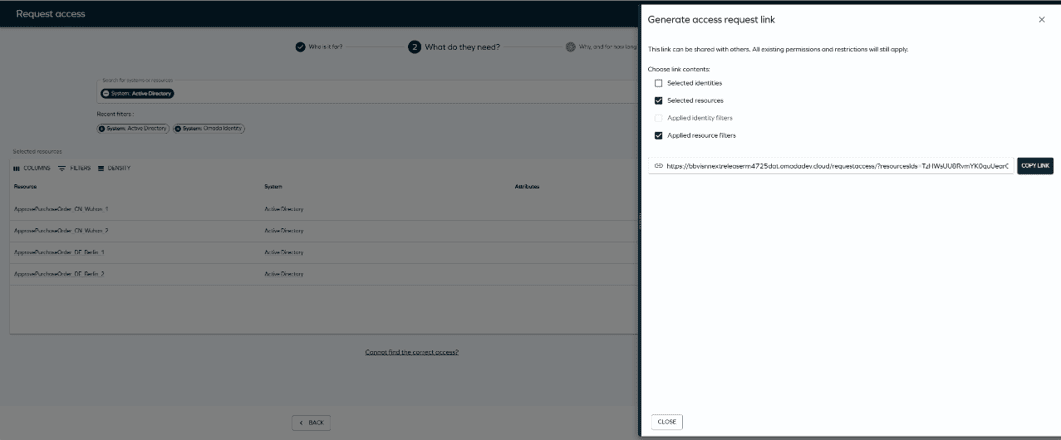
Managers share a single link that opens the request view pre-configured and ready to submit.
Full Visibility Into Child Assignment Status
Access request pages now surface violation and provisioning status for child assignments directly in the panel. Previously, child assignment issues were not visible at the parent level, leaving gaps in access health visibility. Reviewers now get an accurate, complete picture of assignment health without manually investigating every child resource.
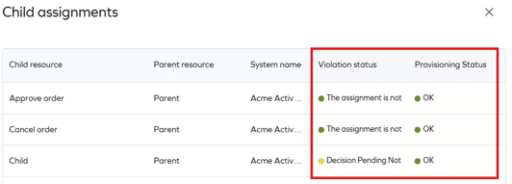
Violation and provisioning status for child assignments are visible directly on the Access Request page.
Send Notifications Directly from Identity and Account Records
Administrators and managers can now send notifications directly from identity and account records, from both list and detail views. A side panel allows users to select a predefined email template or write a custom message, without leaving the current page.
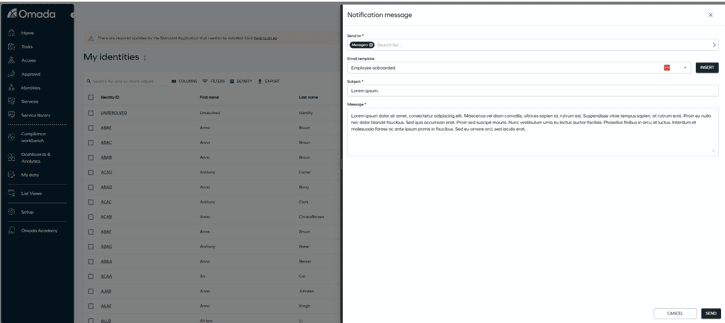
Send notifications without navigating away from the current view.
Cloud Application Gateway Now Available as a Docker Image
The Cloud Application Gateway is now available as a Docker image, deployable on any container management platform. Dockerized deployment brings average new customer onboarding time to under 30 minutes.
Customers can also download a tenant-specific configuration file directly from the Cloud Management Portal. The file includes all environment-specific settings and can be injected at container runtime or built into automated deployment pipelines. This ensures the Cloud Application Gateway is securely registered, correctly bound to the right environment, and deployed in a standard, supportable way.
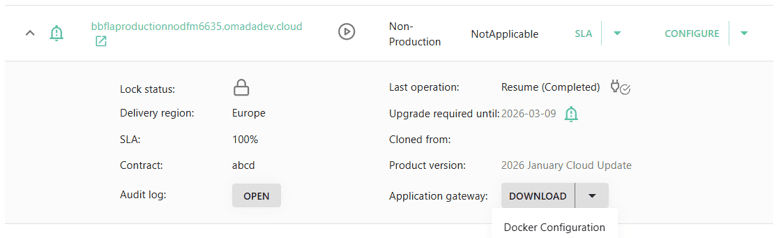
A tenant-specific Docker configuration file can be downloaded directly from the Cloud Management Portal.
Centralized Visibility and Control Across Gateway Instances
A new centralized UI view brings all deployed CAG instances together in one place, displaying role, machine identity, service identifier, heartbeat status, and last check-in timestamp. Administrators can also restart gateway services directly from the interface. This eliminates the need for backend access or specialist involvement to verify gateway health, reducing troubleshooting time and operational risk in distributed and scaled environments.
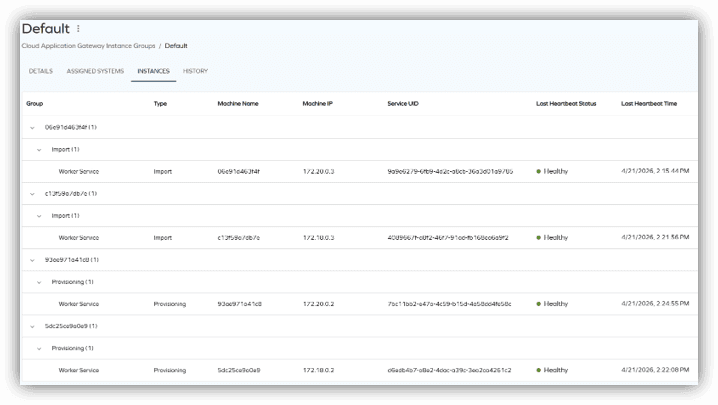
All deployed gateway instances, health status, and technical details are visible in a single centralized view.